“Which metrics should we look at, and how, when searching for a team’s growth areas?” Project managers at our company ask themselves this question regularly, because managers are responsible, among other things, for the efficiency of processes. The right answer depends on the context of the team, the customers, the product, the workflow and much more. Still, there is a set of metrics, and reports built on them, that are universal and can serve as a basis for analysis. And since hh.ru has been using the Kanban Method for the last several years, the metrics below overlap heavily with what that method offers.
I am a project manager at hh.ru. In this article I will show the main reports I look at, with examples of what to pay attention to in them in order to keep improving efficiency.
Basic Terms
Before we start, let us define a few terms:
- Service: a serving unit made up of one or several people who jointly do work (most often intangible) to create products.
- Percentile: the value that a given random variable does not exceed with a fixed probability, expressed as a percentage. For example, if we say that the 85th percentile of lead time is 100 days, it means that 85% of tasks are completed in no more than 100 days.
- Lead time: the time spent on completing a task, from the moment of commitment to full completion.
- Cycle time: the time a task spent in progress within a particular cycle.
- Class of service: a category that can be assigned to an incoming request to determine the order in which it is handled, so that the business gets the maximum benefit.
Lead Time Histogram
One of the basic metrics is lead time. Our lead time starts when any team member begins working on a feature and ends when the client receives the final value. So our lead time includes the Discovery stage (with 4 internal statuses), Delivery (4 statuses), A/B test (3 statuses) and even PostProduction (at this stage we take care of everything we did not manage to do earlier: removing experiment code, running marketing activities and so on).
I will show the reports using an internal system integrated with Jira, which we developed and which I have maintained and developed over the last couple of years. I will not promote it for general use: because it is heavily customized to our processes, we decided at the time not to maintain it as an open-source project. The same charts and the same analysis can be built in Excel, Grafana and similar tools. You can also use the Jira Metrics Plugin developed by my colleague Anvar Khakimov. The plugin is widely used at hh.ru and other companies to build analytical reports. Detailed documentation on how to use it is available on the project website.
The first chart we created is the lead time histogram. Its main purpose is to show how many features we deliver within a given time. Figure 1 shows, for example, that 3 tasks took 20 to 25 days, 1 task took 25 to 30 days, and so on.
All data in the charts is fictional.
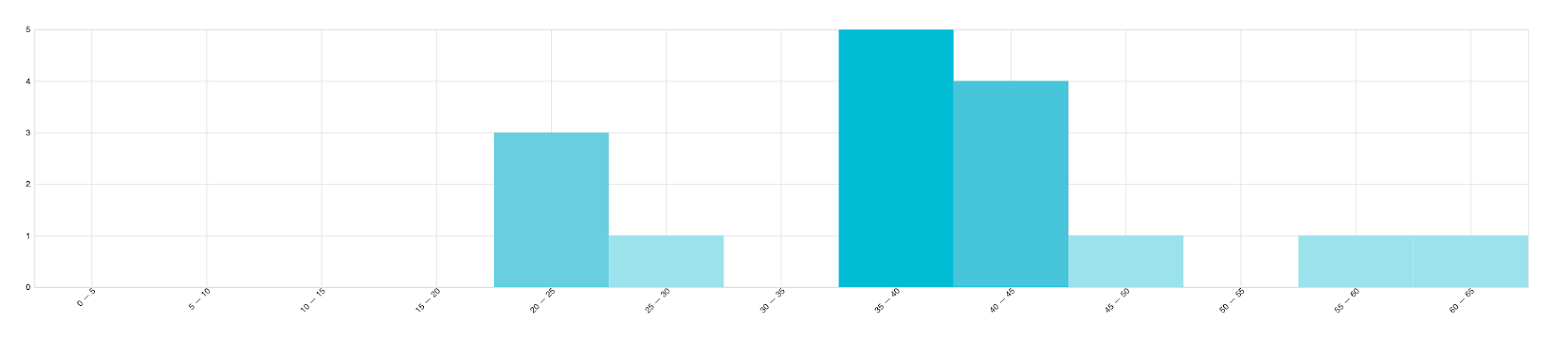
| Percentile | Lead time |
|---|---|
| 50 | 39 d 12 h |
| 75 | 43 d 13 h |
| 80 | 44 d 16 h |
| 85 | 48 d 16 h |
| 90 | 53 d |
| 95 | 57 d 6 h |
| 100 | 61 d 1 h |
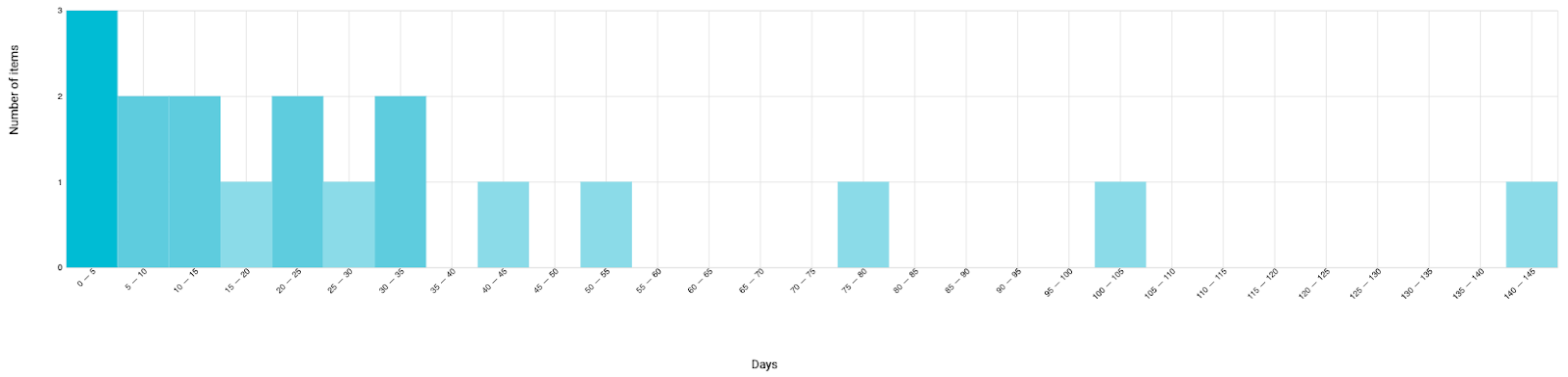
| Percentile | Lead time |
|---|---|
| 50 | 22 d 0 h |
| 75 | 40 d 10 h |
| 80 | 47 d 19 h |
| 85 | 61 d 20 h |
| 90 | 83 d 7 h |
| 95 | 108 d 0 h |
| 100 | 141 d 2 h |
Several important conclusions can be drawn from this chart right away. First, the histogram shows how your system copes with deviations. If you see a long or “fat” tail, the system is unpredictable and handles deviations poorly. Small tails, however, are normal, because fighting deviations sometimes costs more resources (time or money) than their negative consequences. By the way, a fat tail can be identified not only by eye but also mathematically. There are several ways to do this. For example, Kanban University suggests considering a tail fat if its curve lies above the exponential curve. Mathematically, this is calculated with the formula:
98th percentile / 50th percentile > 5.6
In addition, this chart shows the various percentiles of lead time. To cut off unwanted tails and get a more honest picture of the service, values from the 80th to the 99th percentile are usually used. We use the 85th percentile; this is a practice that has historically taken hold in our company (and in the industry in general).
For example, in Figure 1 we see that Team 1 handles “tails” well and has no strong deviations. Team 2 in Figure 2, on the other hand, has no clear peak but has a long tail, so its lead time is harder to predict. This means that from this chart we cannot say with a high degree of certainty how much time the second team will spend on its next task. For the first team, however, we can forecast the lead time of future tasks more accurately, with 85% confidence.
Further, if the chart shows more than one distinct peak, this may point to different classes of service. In our case, Figure 2 is flat, without pronounced spikes, while Figure 1 visibly shows 2 peaks. But, first, more data should be accumulated, since there are relatively few tasks, and second, only a subsequent qualitative analysis of the tasks can confirm or refute the assumption of different classes of service.
In the following examples I will look at the metrics of the second team in more detail.
Box Plot
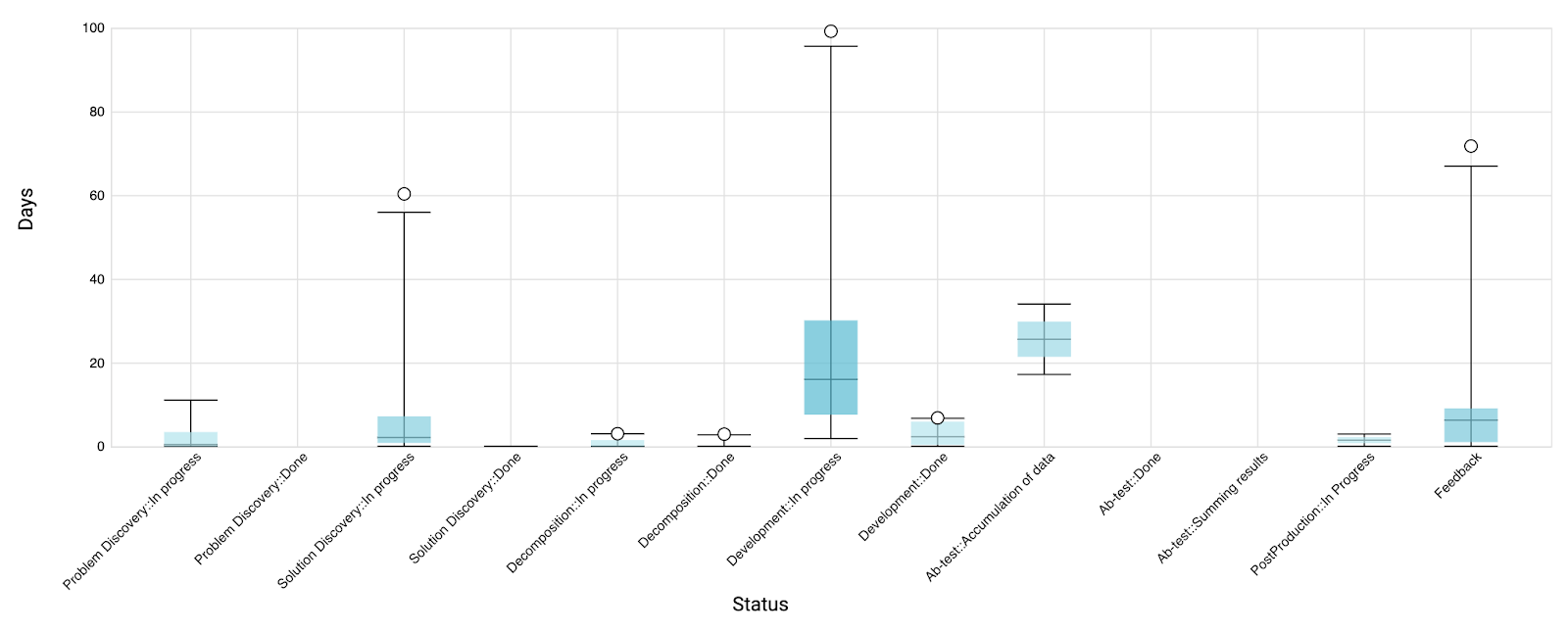
Once we have analyzed lead time, we can focus on the statuses that affect it. Figure 3 shows the 1st, 25th, 50th, 75th, 99th and 100th percentiles for each status.
First, the chart can reveal that some statuses take more time than you expected. This is typical for buffer statuses. You often do not notice how much time they take, yet they have a strong impact on lead time. Whether you are actively working on a task or just waiting for something, your client is waiting for the feature the whole time. A long buffer status may be explained by the next status being a bottleneck in your system that needs to be optimized. In Figure 3, the “Development: done” status is the longest of the buffer statuses, but it is not long enough to say that we have an obvious problem here.
Second, you can look at the ratio of time between different statuses. Management decisions can be made based on this information. For example, if you see that testing takes dramatically more time than development, this may prompt you to reallocate resources.
Third, as with lead time, the chart lets you track outliers. In our case there are unpredictable statuses such as “Solution Discovery: In Progress”, “Development: In Progress” and even “Feedback” (which is not included in lead time). Looking at Figure 3, we can assume that in 75% of cases we will complete research, development or feedback fairly quickly. The last 25% of features, however, can take significantly longer.
As a bonus, this chart helps identify statuses you no longer use, which may prompt you to revisit your workflow. On our chart, for example, this is “Problem Discovery: done” (the empty A/B testing statuses in our case are explained by the fact that they were introduced very recently).
Quarterly Report
In the previous steps we looked at lead time values and studied how cycle times affect it. Think for a second: how do you tell whether it is good or bad? Maybe by comparing different services? I consider that a bad idea, because different services have different stakeholders, specifics, contexts, products, teams, people and so on. Instead, we can compare our service with… our own service in the past. Comparing quarters lets us track the trend. Comparing values over a period shorter than a year makes no sense; the longer the period, the more accurate the picture. Note that quarterly intervals work well specifically for our feature development duration. If your tasks are smaller or larger, you should adjust the time frame.
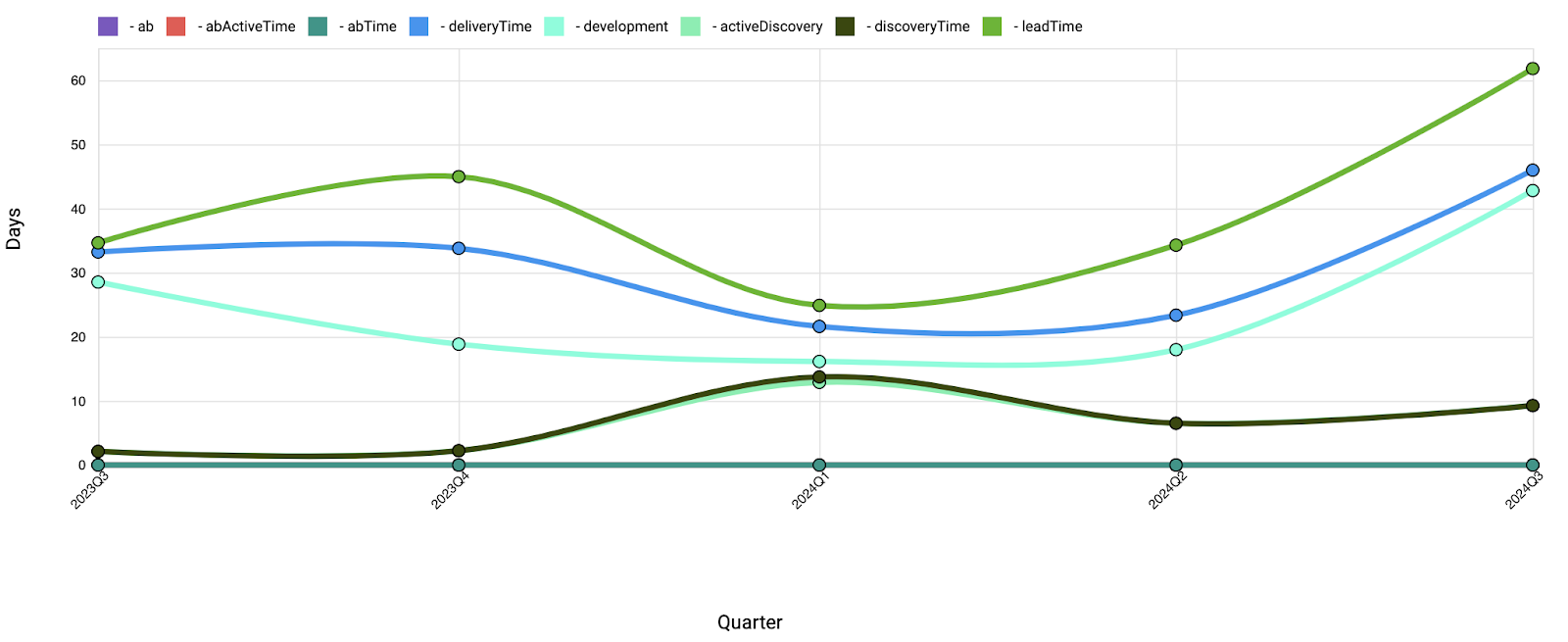
The chart in Figure 4 shows both lead time and the time of the various cycles. Here we see an increase in lead time (in fact, its 85th percentile) associated with an increase in development time. Going back to Figure 2, we can identify several large tasks that contributed to the growth of lead time.
Control Chart
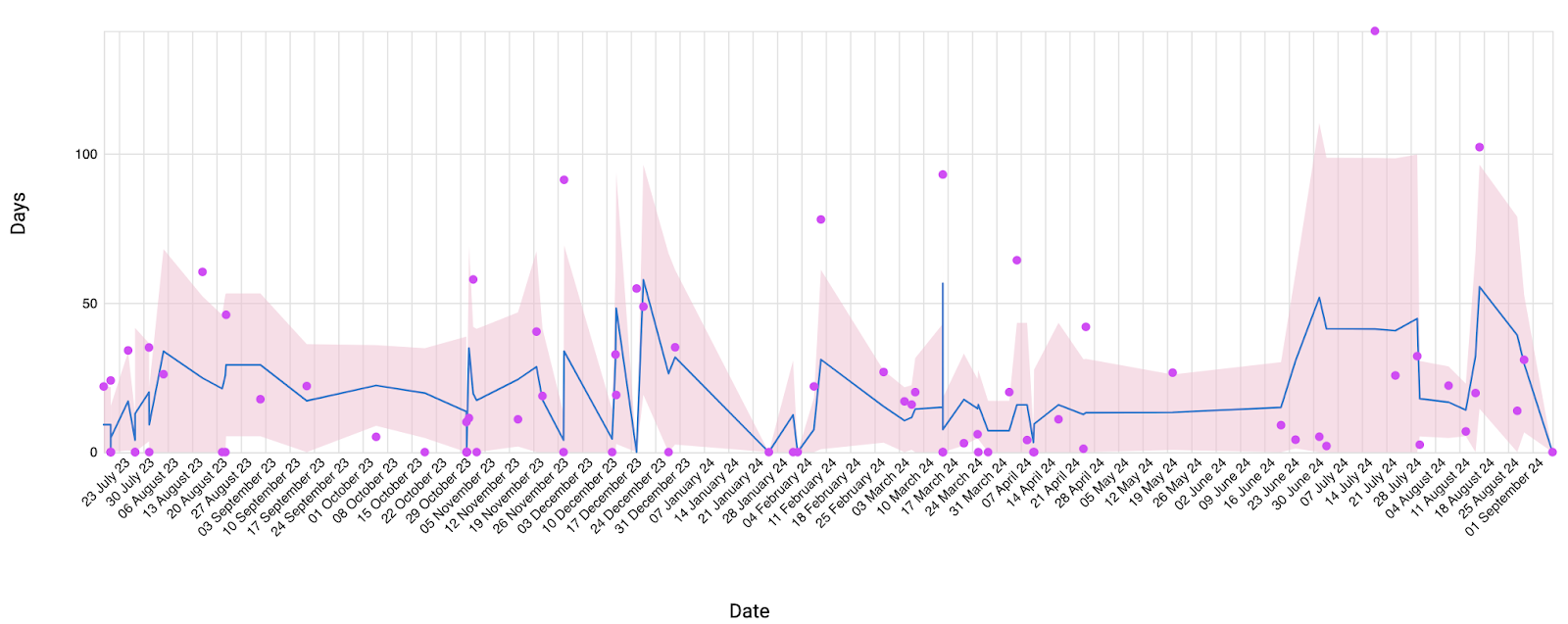
Another way to measure dynamics is a control chart. It helps assess the predictability of our service and detect signals that point to an increase or decrease in the system’s entropy. In Figure 5, the blue line shows the average value for each time period, and the pink area shows the standard deviation. A wider pink area means worse predictability. For example, we can see that predictability in the third quarter is lower than in the previous period, primarily because of more severe outliers.
This chart should be treated with caution, since it is most useful for services that produce very uniform products (factories, for example). The community debates whether it can be applied to complex systems such as those engaged in software development. In my view, if it can, then only after filtering and comparing the most similar tasks (for example, tasks that were initially estimated the same). Vasily Savunov’s blog covers this report in great detail.
Cumulative Flow Diagram
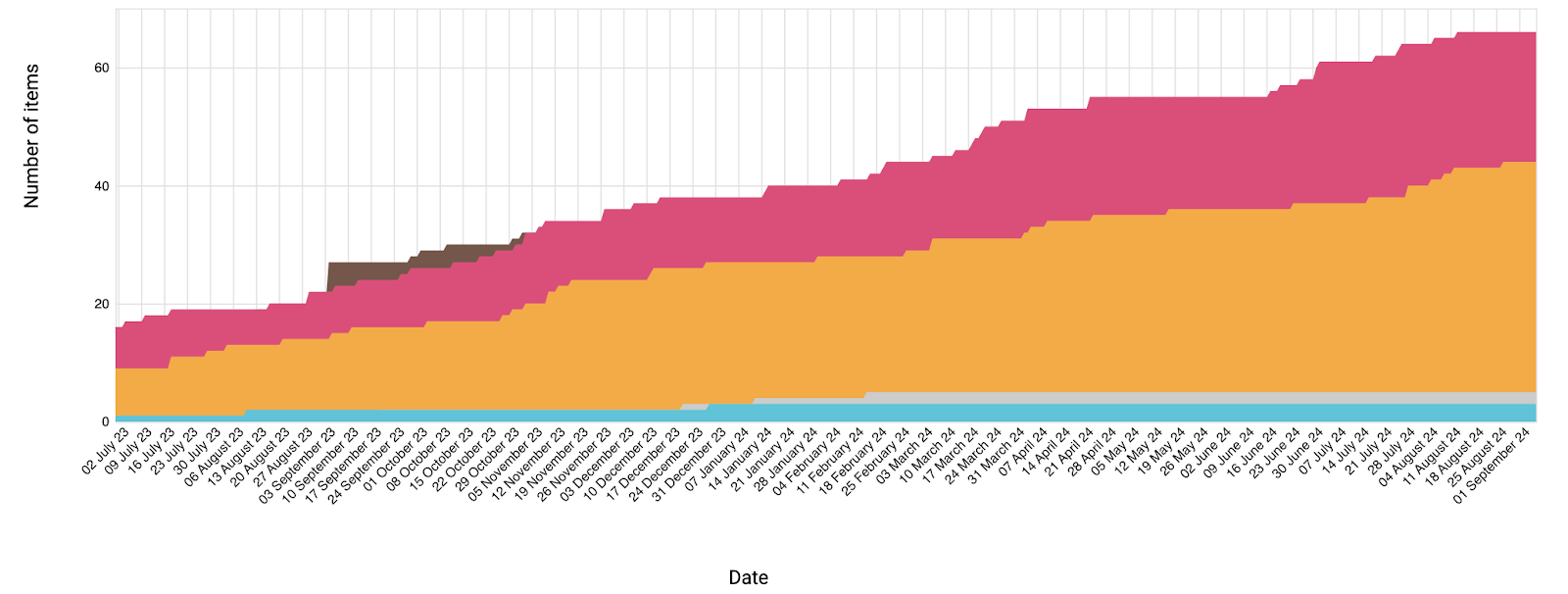
The dynamics of cycle times can also be tracked with a cumulative flow diagram (Figure 6). In the theory of the Kanban Method it is one of the key charts and deserves separate attention, so I will leave its analysis for a future article.
Table View
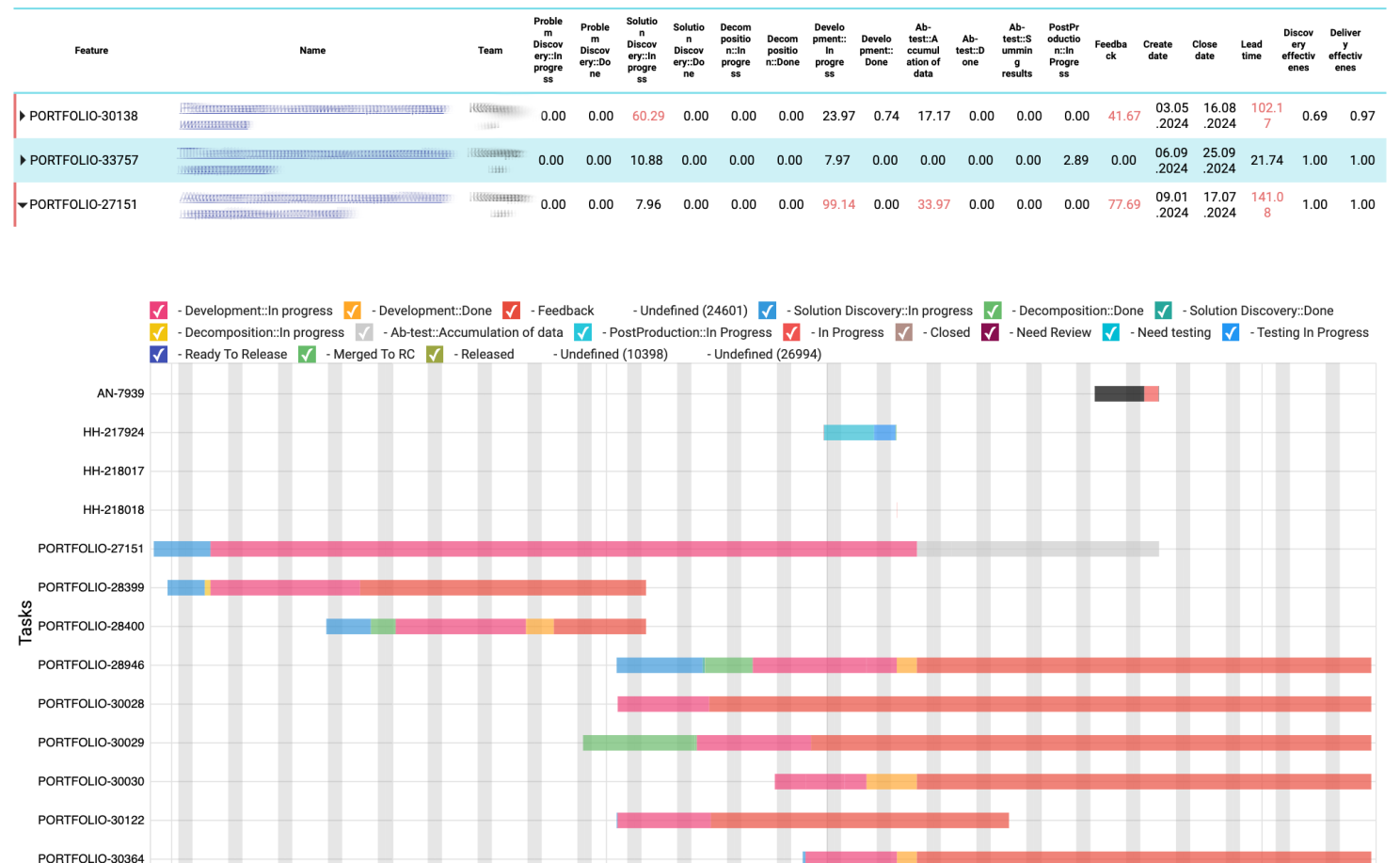
After analyzing the global metrics, we can dig into local problems. To do this, we need to focus on each problematic feature. For me, the symptom of such a problem is usually either spending more than 25 days in any one status or a forecasting error of more than 30%. For each such feature, we can analyze at which stages and within which subtasks problems arose. A practice that helps us a lot is having developers record the problems they run into in Jira while working on a task. If a problem stops work on the task, we mark the task as blocked and also track this in the subsequent analysis. For convenience, we display all statuses of all tasks of a feature on a timeline (Figure 7).
Throughput
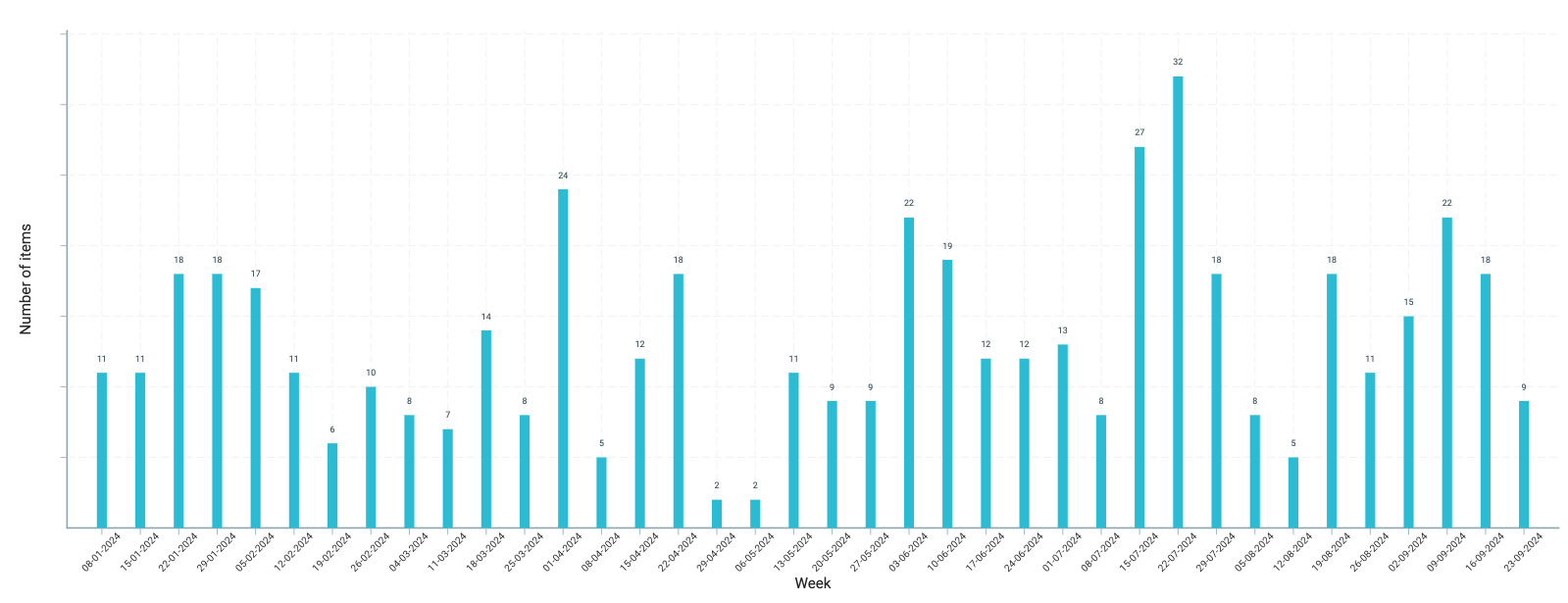
I rarely analyze work below the feature level, but the throughput of tasks (not features) is one of the “health” metrics I track. The chart in Figure 8 shows how many tasks our team completes each week. If we notice any anomalies, it is a signal to investigate their causes. For example, this chart sometimes captures deviations caused even by the political situation in the world. In such cases, it is important to make sure that a one-time change does not later become the norm.
How Do You Compare Story Points and Development Time?
The short answer is: you don’t. In practice these are poorly related entities. From time to time we experimented with measuring story points and comparing them with the time spent. We even have a separate chart for this. But in my view there is little value in it. We tried to find a correlation between:
- development time and the estimate in story points;
- the number of days spent per story point and the overall feature estimate;
- estimation errors and the estimates themselves;
- how often deadlines changed and the feature estimate.
The resulting charts showed weak or no correlation between these parameters. I believe this is due to estimation errors and the complexity of the tasks and of the environment we work in.
Conclusion
In this article I gave an overview of the main metrics and the key conclusions that can be drawn from them. To sum up how and which metrics to look at when searching for a team’s growth areas:
- Analyze the current lead time using its histogram.
- Analyze the impact of individual stages on lead time using a box plot.
- To understand how satisfactory the values are, study lead time and cycle time over time (for example, compare them by quarter). In some cases a control chart can also show how the system’s predictability changes over time.
- Move from the general to the specific and analyze the “problematic” features.
- Monitor your service’s throughput regularly.
I regularly observe the behavior of our system following this sequence or shortened versions of it. Many of the reports come with a note that the community either doubts their usefulness or interprets them in several ways. So metrics are an important but not the only way to learn about a system. Collecting feedback, for example, is an excellent tool that should be used alongside metrics to get a complete picture. That is why I encourage you to watch metrics (whether the ones described in this article or others), build their analysis into the cycle of continuous improvement, and not limit yourself to metrics alone.